Skip to content

PropertyWidget

PropertyWidgetPropertyWidget

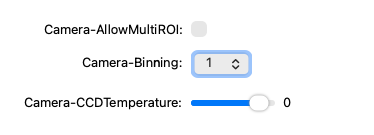
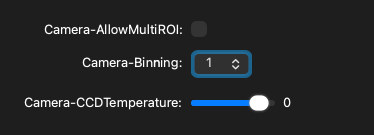
Screenshot generated from the example below.

Example

examples/property_widget.py
from pymmcore_plus import CMMCorePlus
from qtpy.QtWidgets import QApplication, QFormLayout, QWidget

from pymmcore_widgets import PropertyWidget

app = QApplication([])

mmc = CMMCorePlus.instance()
mmc.loadSystemConfiguration()

wdg = QWidget()
wdg.setLayout(QFormLayout())

devs_pros = [
    ("Camera", "AllowMultiROI"),
    ("Camera", "Binning"),
    ("Camera", "CCDTemperature"),
]

for dev, prop in devs_pros:
    prop_wdg = PropertyWidget(dev, prop)
    wdg.layout().addRow(f"{dev}-{prop}:", prop_wdg)

wdg.show()

app.exec()

API

Bases: QWidget

Widget to display and control a single device property.

Parameters:

Name Type Description Default
device_label str

Device label.

required
prop_name str

Property name.

required
parent QWidget | None

Optional parent widget.

None
mmcore CMMCorePlus | None

Optional core instance. If not provided, uses the global instance.

None
connect_core bool

If True, widget changes update the core and vice versa.

True

valueChanged

valueChanged = Signal(object)

Emitted with the new value when the property value changes.

inner_widget property

inner_widget: QWidget

Return the inner value widget (spinbox, slider, combobox, etc).

value

value() -> Any

Get the current widget value.

setValue

setValue(value: Any) -> None

Set the widget value.

refresh

refresh() -> None

Update the value of the widget from mmcore.

(If all goes well this shouldn't be necessary, but if a propertyChanged event is missed, this can be used).

propertyType

propertyType() -> PropertyType

Return the property type.

deviceType

deviceType() -> DeviceType

Return the device type.

isReadOnly

isReadOnly() -> bool

Return True if the property is read-only.

isPreInit

isPreInit() -> bool

Return True if the property is pre-initialization.

allowedValues

allowedValues() -> tuple[str, ...]

Return allowed values if property has constraints.