Skip to content

TimePlanWidget

TimePlanWidgetTimePlanWidget

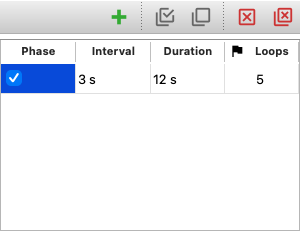
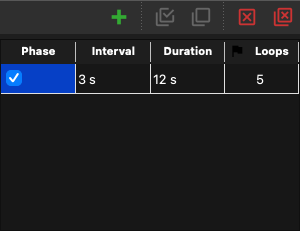
Screenshot generated from the example below.

Example

examples/time_plan_widget.py
"""Example usage of the TimePlanWidget class.

TimePlanWidget edits a useq time plan.  It doesn't use a CMMCorePlus.

Check also the 'mda_widget.py' example to see the TimePlanWidget
used in combination of other widgets.
"""

import useq
from qtpy.QtWidgets import QApplication

from pymmcore_widgets import TimePlanWidget

app = QApplication([])

t_wdg = TimePlanWidget()
t_wdg.setValue(useq.TIntervalLoops(interval=3, loops=5))
t_wdg.valueChanged.connect(lambda: print(t_wdg.value()))
t_wdg.show()

app.exec()

API

Bases: DataTableWidget

Table to edit a time plan (useq.AnyTimePlan), one row per phase.

valueChanged

valueChanged = Signal()

Emitted (with no arguments) when the table changes; read it with value().

COLUMNS

COLUMNS: tuple[ColumnInfo, ...]

PHASE

PHASE = TextColumn(key='phase', default=None, is_row_selector=True)

INTERVAL

INTERVAL = TimeDeltaColumn(
    key="interval", default="1 s", minimum_unit="milliseconds"
)

DURATION

DURATION = TimeDeltaColumn(
    key="duration", default="0 s", minimum_unit="seconds"
)

LOOPS

LOOPS = IntColumn(key='loops', default=1, minimum=1)

table

table() -> DataTable

toolBar

toolBar() -> QToolBar

value

value(
    exclude_unchecked: bool = True,
) -> MultiPhaseTimePlan | TIntervalLoops | TIntervalDuration

Return the current value of the table as a useq.AnyTimePlan.

Returns:

Type Description
MultiPhaseTimePlan | TIntervalLoops | TIntervalDuration

The current time plan (useq.AnyTimePlan) value of the table.

setValue

setValue(value: Any) -> None

Set the current value of the table from a time plan (useq.AnyTimePlan).

Parameters:

Name Type Description Default
value MultiPhaseTimePlan | TIntervalLoops | TDurationLoops | TIntervalDuration | None

The time plan (useq.AnyTimePlan) to set.

required